 Vulkan Research
How does Orion move?
How a named movement becomes smooth motion: five joints, poses and keyframes, curves instead of straight lines, and a loop that steers the motors 50 times a second. Every animation here runs Orion's own motion software in your browser.
When Orion glances at you, nothing in it thinks “turn the head”. A file says which poses to pass through and how long to take, a program works out a smooth path between them, and five motors follow that path one small step at a time. This lesson takes those pieces in order. The lamps below run the same motion software as the real Orion.
Five joints
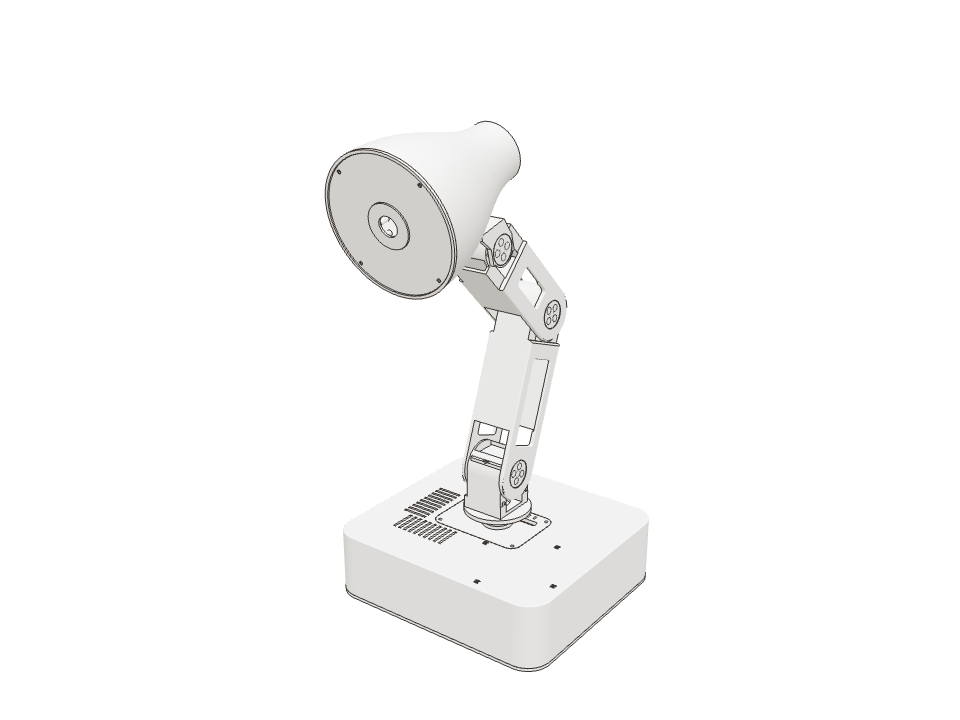
Orion’s body has five places where it can bend or turn. Each one is a Joint A place where two parts of a robot are connected so one can turn relative to the other. Each of Orion's joints has one servo., and each joint has its own motor. The base turns the whole arm left and right, the shoulder and elbow raise and fold the arm, and the head can nod and swivel.
That’s all the movement Orion has. Every gesture you’ll see, from a yawn to a laugh, is these five angles changing together.
On Orion Each joint stops short of its full range, at a Joint limit The furthest a joint is allowed to turn each way, set so the lamp never hits itself or strains a part. measured on the real lamp. The sliders stop there too.
Under the hood
The joints are named base_yaw_joint, shoulder_pitch_joint, elbow_pitch_joint, head_pitch_joint and
head_roll_joint. “Yaw” means turning around a vertical axis, “pitch” means tipping up and down, and “roll” is the
head’s swivel. Their limits live in hardware/profiles/v2-joints.json.
What’s a servo?
Orion’s motors are Servo A small motor with a position sensor and its own controller: you send it an angle and it turns there and holds it.. A servo isn’t told “spin”; it’s told an angle, and it turns there and holds. Inside, a Position sensor (encoder) A sensor inside the servo that measures the angle of its output. Orion's counts 4096 steps per full turn. keeps measuring where the output actually is, so the servo can correct itself and report back.
That’s what makes precise movement possible: the software only has to decide which angle each joint should be at, moment by moment.
On Orion Orion’s servos measure 4096 steps per turn, so each step is less than a tenth of a degree.
Under the hood
Orion uses Feetech STS3215 serial bus servos: all five share one cable and each has an ID from 1 to 5. Orion sets the
zero of every joint with the lamp folded flat, its rest pose, and converts a reading to an angle with
(raw − 2047) × 2π / 4096 Radian A unit for angles that robot software prefers. One full turn is about 6.28 radians, so one radian is about 57 degrees..
Poses and motions
A Pose A complete set of joint angles, one for every joint: a snapshot of how the robot is standing. is a named set of five angles: home, rest, look_left. A motion is a list of
Keyframe A pose the robot should reach at a certain moment in a movement. The software fills in the movement between keyframes., each saying “reach this pose, taking this long”.
Some motions name poses directly. Others, like a nod, are small changes from wherever the lamp already is, so the same nod works whether Orion is looking left or right.
On Orion Orion has 26 named poses and 47 built-in motions, each a short text file.
Under the hood
This is look_at_left_expressive, from motion/motions/v2/:
motion:
  name: look_at_left_expressive
  space: absolute
  style: expressive_turn
  keyframes:
  - pose: look_left_anticipation
    duration: 0.25
    arrival: through
  - pose: look_left_lean
    duration: 0.4
    arrival: through
  - pose: look_left_overshoot
    duration: 0.3
    arrival: through
  - pose: look_left
    duration: 0.35
arrival: settle- 1look_left_anticipation0.25 s · through
- 2look_left_lean0.40 s · through
- 3look_left_overshoot0.30 s · through
- 4look_left0.35 s · settle
Why doesn’t Orion jerk?
The simplest way to get from one keyframe to the next is a straight line: move at a steady speed, then stop. But a straight line starts at full speed and stops dead. That instant change in speed is a jolt: it rattles the arm and makes the motors clunk.
Orion joins its keyframes with curves instead. Each one starts gently, speeds up, and slows down before it arrives.
Guess first The two lamps reach the same poses at the same moments. Which one goes faster at its fastest?
Orion’s. To leave and arrive gently but still be on time, a curve has to make up the time in the middle. Look at the peak of the black line in the speed chart.
Under the hood
Each joint’s path between two keyframes is a Quintic curve A smooth curve, from a fifth-power formula, that lets a movement start and stop at chosen speeds and accelerations, so it can begin and end gently., a fifth-power polynomial chosen
so the position, Speed (velocity) How fast an angle is changing, and in which direction. Measured here in degrees per second. and Acceleration How fast the speed is changing. A sudden change in speed means a huge acceleration, which is what a jolt is. at both ends are
exactly what was asked for. See runtime/src/motion/trajectory.rs.
Passing through or stopping
Each keyframe says how to arrive. Settle means stop there, with no speed left. Through means keep moving: the keyframe is a point to pass, not a place to stop.
A glance left and then right reads as two separate looks when both keyframes settle, and as one sweeping look when the first passes through.
On Orion A motion’s last keyframe must always settle, so every movement ends at rest.
50 times a second
The smooth curve is a plan. To follow it, Orion’s Runtime The program on Orion's Raspberry Pi that owns the motors. Everything else has to ask it to move. runs a Control loop A program that repeats forever: measure, decide, act. Orion's runs 50 times a second.: read where each motor is, work out where the plan says it should be right now, and send the five new angles. Then it does it again, 20 milliseconds later.
Slow the glance down and you can see the separate steps that make up the smooth movement.
On Orion The loop runs 50 times a second. Slow work such as speech recognition runs elsewhere, so it can never hold the loop up.
Speed limits
A motor can only turn so fast. If a motion asks for a big turn in very little time, it would need a speed the motor doesn’t have.
Orion’s Compiler Here, the part of Orion's software that turns a motion file (keyframes and timings) into a full trajectory the motors can follow., the part that turns motion files into paths, checks every plan against that limit. When a move is too fast, it doesn’t fail: it makes the move take longer until the speed fits.
On Orion Orion’s servos top out around 312° per second (52 turns a minute).
Under the hood
The compiler estimates each segment’s peak speed by sampling its curve, stretches the segments that are too fast, and
tries again, up to 12 times. The ceiling is STS3215_MAX_SPEED_RAD_S, about 5.45 radians per second.
Moving relative to where you are
Most of Orion’s small gestures, such as nods, bounces and breathing, aren’t written as poses. They’re written as small changes from the current pose, the Anchor The pose a small gesture is performed around. A nod moves a little away from the anchor and back to it.: “head up a little, then back”. That’s why one happy bounce works wherever Orion happens to be.
There’s one catch. Near a joint limit the full gesture might not fit. Rather than clip it, Orion shrinks the whole gesture evenly, so it keeps its shape.
On Orion Every relative motion has to end back at its anchor. Orion refuses one that doesn’t.
Under the hood
A relative keyframe resolves to anchor + style amplitude × scale × offsets. One scale between 0 and 1 is chosen
for the whole motion, the largest that keeps every joint inside its limits.
speak_react_happy, works wherever the lamp happens to be: its keyframes say "a little up from here", not "go to this angle".Styles
The same keyframes can be performed calmly or briskly. Every motion names one of eight styles, and the style sets how it moves: how fast it travels, how much it flows through keyframes, whether the joints move a little out of step, and how long it takes to settle.
This is how a thinking gesture comes out slow and drifting while a reaction comes out quick and crisp, without writing every movement twice.
Guess first Pick the thinking style. Will the glance take more time or less?
More: thinking has a tempo of 0.68, so every travel time is divided by 0.68 and comes out about half as long again.
| speed of travel | 1.00 |
|---|---|
| flow through keyframes | 0.72 |
| joints out of step | 0.22 |
| size of relative moves | 1.00 |
| push past the target | 1.00 |
| time to settle | 0.62 |
Who gets to move
Many parts of Orion want to move the lamp: idle breathing, listening, speaking, a requested motion, the Stop button. They can’t all move it at once, so movement has an order of priority. A higher priority takes over immediately; a lower one waits its turn.
The handover is smooth because the new movement starts from exactly where the old one was, and at the same speed.
On Orion Only the runtime ever sends angles to the motors. Everything else, including voice and Studio, has to ask it (Meet Orion shows the gatekeeper).
- Stop pressed in Studio ·
return_home - "Look to your left" ·
look_at_left_expressive - Orion replying ·
speak_calm_sway - You start talking ·
listen_lean_in - Nothing else going on ·
idle_breathe
- Waiting. Pick something for Orion to do.
Asked for vs actual
The plan is what Orion asks for, not what happens. A real motor carries a real arm, so it trails the plan slightly and doesn’t quite reach every quick peak.
That’s why a movement isn’t “done” when its timeline ends. Orion waits until the measured joints have stayed close to the final pose, which it calls settling.
On Orion In this recording the head trails the plan by about 60 milliseconds. The shoulder, which carries the whole arm, trails by about 140.
Make your own motion
Now put it together. Pose the lamp with the sliders, add keyframes, choose a style, and press Compile and play. Your motion goes through Orion’s own compiler, so the result is exactly what the real lamp would do, including the messages it gives when it refuses.
When you like it, open “See it as Orion’s motion file”: that text is a motion Orion can load.
On Orion The lamp starts every motion from home, just as Orion does when it wakes.
See it as Orion's motion file
format_version: 2
motion:
  name: my_motion
  description: "Made in the Vulkan Research lesson."
  space: absolute
  style: attentive
  keyframes:
  - pose: my_pose_1
    duration: 0.8
    arrival: through
  - pose: my_pose_2
    duration: 0.7
    arrival: through
  - pose: my_pose_3
    duration: 0.9
    arrival: settle

# poses.yaml additions
  my_pose_1:
    positions: {base_yaw_joint: -0.8378, shoulder_pitch_joint: 0.8183, elbow_pitch_joint: -1.1530, head_roll_joint: -0.4538, head_pitch_joint: -0.4594}
  my_pose_2:
    positions: {base_yaw_joint: 0.0109, shoulder_pitch_joint: 0.7833, elbow_pitch_joint: -1.1780, head_roll_joint: -0.0072, head_pitch_joint: -0.5594}
  my_pose_3:
    positions: {base_yaw_joint: 0.0109, shoulder_pitch_joint: 0.8633, elbow_pitch_joint: -1.1380, head_roll_joint: -0.0072, head_pitch_joint: -0.3594}
home. Every keyframe needs a pose and a travel time; the last one must settle. Try making it fast, or ending on "through", and see what the compiler says.