 Vulkan Research
Meet Orion
What Orion is made of, what each part does, and the path one spoken sentence takes through the lamp.
Orion is a desk lamp that listens, talks and moves like a character. This lesson is the map: what’s inside it, how the pieces pass work to each other, and which rules keep it safe. The other lessons zoom in on each part.
What’s inside the lamp
Orion is a small computer with senses and muscles, shaped like a lamp. A Raspberry Pi A credit-card-sized computer. Orion's is a Raspberry Pi 5 that sits in the lamp's base. in the base is the brain. Microphones are its ears, a camera in the head is its eyes, a speaker is its voice, five motors are its muscles, and a ring of LEDs is both its lamp and its way of signalling.
On Orion Every part is something you can buy; the full list is on the Resources tab.
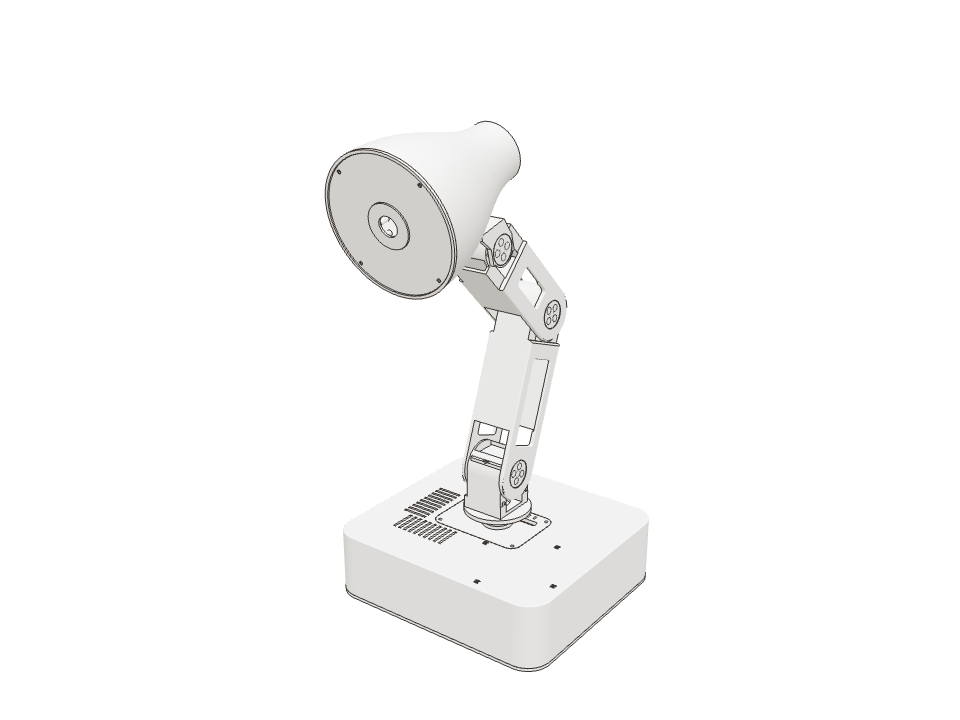
ComputerA Raspberry Pi 5 in the base runs everything: hearing, speaking, moving and the camera.
One sentence, end to end
Ask Orion a question and it passes through a chain of programs, each doing one job and handing its result to the next: hear the Wake word A phrase a voice assistant always listens for, like “Hey Orion”. Everything else it hears is ignored., turn speech into text, write a reply, turn the reply into a voice, then speak and move.
Most of the chain runs on the lamp. Only the reply itself is written by an online Language model An AI model that reads text and writes text. Orion's replies are written by one called Codex..
On Orion How does Orion hold conversations? follows this chain step by step.
Under the hood
The programs are separate services on the Pi: orion-listener (microphone and wake word), orion-voice-stack
(coordinator, Qwen and Piper workers, and the agent that talks to Codex), orion-vision (camera) and oriond
(motors, light and speaker). They talk over local sockets. See docs/system-architecture.md.
You say “Hey Orion, will it rain tomorrow?” The microphones turn the sound into a stream of numbers. How does Orion hold conversations? →
Only one part moves the motors
Many parts of Orion have reasons to move it: voice wants it to turn toward you, the camera wants to follow your hand, Studio wants to play a scene. None of them drive the motors. They all ask one program, the Runtime The program on Orion's Raspberry Pi that owns the motors. Everything else has to ask it to move., which checks every request first.
Having one gatekeeper is a safety rule. It means one place decides about limits, rest and Stop, and nothing can sneak around it.
Guess first Orion is resting and the camera sees your hand. Will it wake up to follow it?
No. A hand in view can’t wake a resting lamp; only a confirmed “Hey Orion” can. Try it on the map.
Tap a box on the left to send its request.
Fast loop, slow thinking
The runtime steers the motors 50 times a second. Recognising speech or writing a reply takes seconds. If the motors had to wait for that thinking, Orion would freeze mid-gesture every time it listened.
So the slow work runs in separate programs. The fast loop never waits for them; it just picks up their results when they’re ready.
On Orion Model inference and network waits always run outside the 50-a-second movement loop. How does Orion move? shows that loop up close.
What needs the internet
Orion does most of its work on the lamp: hearing, understanding speech, speaking, moving, the light, alarms and the camera. Only two things go online: the Language model An AI model that reads text and writes text. Orion's replies are written by one called Codex. that writes its replies, and web search.
That keeps it quick and private. Your voice is turned into text on the lamp; what goes online is the text.
On Orion Camera images stay in the Pi’s memory. One goes online when you ask Orion to look at something, and with each spoken remark in Demo mode. More in How does Orion see?.
- Hearing “Hey Orion”on the lamp
- Turning your speech into texton the lamp
- Speaking in its own voiceon the lamp
- Moving, idling and reactingon the lamp
- The lighton the lamp
- Timers and alarmson the lamp
- Seeing faces and handson the lamp
- Studio on your home networkon the lamp
- Writing replies (Codex)online service
- Searching the webonline service
Awake, resting, waking
When nobody has talked to it for a while, Orion folds down and switches its motors off. Saying “Hey Orion” brings it back. In between, it’s always in exactly one of a few named states, and only certain events can move it from one to the next.
Describing it as a State machine A way to describe a system as a few named states and the events that move it from one to another. is what makes it dependable: there’s no state where it’s half asleep.
Under the hood
Status reports disabled, awake, going_to_rest, resting, waking or fault. Torque is released only after the
motors measure that the rest pose was reached. A failed sleep step tries a direct rest once; if that also fails, Orion
returns home and keeps its light on. See “Automatic rest and waking” in docs/system-architecture.md.
Orion is awake. Pick the event that can happen next.
Studio
Studio is a desktop app for controlling Orion from your computer. It pairs with the lamp over your home network, and lets you move it, edit poses and scenes, change settings and watch what it’s doing.
Studio is a remote control, not the brain. Closing it leaves Orion running exactly as before.
On Orion Studio reaches the lamp through one authenticated gateway, which only accepts a fixed list of requests.